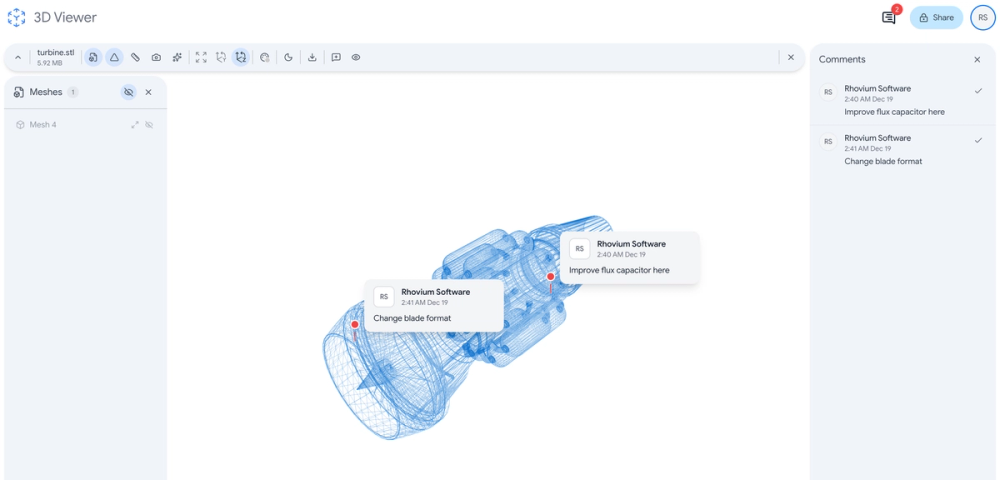
3D Viewer for Google Drive is a powerful online tool that enables users to view, interact with, and share 3D models directly within Google Drive and Gmail without any downloads or installations. The application seamlessly integrates with Google Workspace, allowing professionals, designers, and engineers to preview STL, OBJ, GLB, FBX, STEP, PLY, and 3DM files in their browser. Built with security in mind, the platform streams files directly from Google Drive to your browser without storing them on external servers, ensuring GDPR compliance and Google verification.
Getting started with 3D Viewer for Google Drive is simple and requires no technical expertise. Here's how to begin viewing your 3D files:
1. Install the Add-on - Visit the Google Workspace Marketplace and install the 3D Viewer for Drive add-on to your Google account.
2. Open Your 3D File - Navigate to any 3D file (STL, OBJ, GLB, FBX, STEP, etc.) in Google Drive and open it with 3D Viewer.
3. Interact with Your Model - Use your mouse or touchscreen to rotate, zoom, and pan around the 3D model for detailed inspection.
4. Collaborate with Team - Share models with team members, add comments, and discuss designs directly within the viewer interface.
5. Apply AI Rendering - Transform your 3D models into photorealistic images by selecting from various materials and environments powered by AI.
Google Workspace Integration - View 3D files directly within Google Drive and Gmail without leaving your workflow or downloading additional software.
Multi-Format Support - Import and view all major 3D file formats including STL, OBJ, FBX, GLB, STEP, PLY, and 3DM without any conversion required.
Real-time Collaboration - Share 3D models with team members, add comments, discuss designs, and iterate together in a single shared workspace.
AI-Powered Rendering - Convert 3D models into stunning photorealistic images with AI-powered rendering featuring dozens of materials and environments.
Privacy-First Security - Files stream directly from Google Drive to your browser without passing through external servers, ensuring GDPR compliance.
Advanced Measurements - Utilize measurement tools for precise distance, angle, and dimensional analysis of your 3D models.
Chrome Extension Available - Access 3D viewing capabilities through a dedicated Chrome extension for even faster file previews.
#1 Product Design Review - Designers can share 3D prototypes with stakeholders directly through Google Drive, enabling faster feedback cycles and design iterations without requiring specialized CAD software.
#2 Manufacturing Quality Control - Engineers can inspect 3D models of parts and assemblies, measure dimensions, and verify designs before sending to production.
#3 Architecture Visualization - Architects can present 3D building models to clients via Gmail attachments, allowing immersive walkthroughs without complex setup.
#4 3D Printing Preparation - Makers and hobbyists can preview STL files before printing, checking for errors and visualizing the final result with different materials.
#5 Educational Demonstrations - Teachers and students can explore 3D models in science, engineering, and art courses directly from shared Google Drive folders.
#6 E-commerce Product Display - Online retailers can create photorealistic product renders using AI rendering to showcase items from any angle.
Is 3D Viewer free to use?
Yes, there is a free Personal plan that allows you to view up to 10 gallery files with basic measurement features and basic support. For unlimited access and advanced features, Pro and Team plans are available.
What 3D file formats are supported?
3D Viewer supports all major 3D formats including STL, OBJ, FBX, GLB/GLTF, STEP, PLY, and 3DM files. You can view these formats directly without any conversion.
Is my data secure with 3D Viewer?
Yes, security is a core priority. Your files are never stored on 3D Viewer's servers - they stream directly from Google Drive to your browser. The service is GDPR compliant and Google verified.
Can I collaborate with my team?
Absolutely. You can share 3D models with team members, add comments, and discuss designs together in real-time within the same viewer interface.
What is AI-powered rendering?
The AI rendering feature transforms your 3D models into photorealistic images. You can choose from dozens of materials (like stainless steel or white matte) and environments to create stunning visualizations.