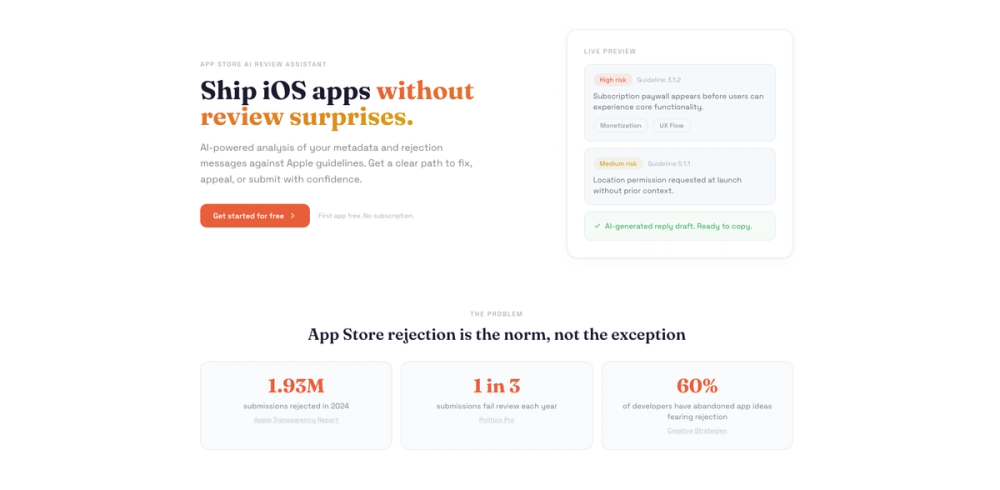
Spot iOS app issues before App Store review
AcceptMyApp is an AI-powered App Store review assistant designed to help iOS developers navigate Apple's app review process with confidence. It analyzes your app metadata and rejection messages against Apple's official guidelines, providing actionable insights to fix issues, craft appeals, or submit apps successfully. With nearly 2 million app submissions rejected in 2024 alone, AcceptMyApp addresses a critical pain point for mobile developers by offering purpose-built AI analysis rather than generic chatbot responses.
Getting started with AcceptMyApp is straightforward and designed for developer efficiency.
1. Add Your App - Enter your app's store metadata, business model, and key features into the platform. This information is stored securely for future analyses.
2. Run AI Analysis - Choose between precheck mode (for apps not yet submitted) or rejection mode (for apps that have been rejected). The AI generates comprehensive results in under 45 seconds.
3. Review Risk Assessment - Examine the AI-scored risk levels (high, medium, low) along with specific guideline citations and detailed issue explanations.
4. Take Action - Use the provided fix recommendations or ready-to-send appeal drafts to respond to Apple's review team immediately.
RAG-Based Guideline Retrieval - Uses retrieval-augmented generation to search through actual Apple guideline chunks, ensuring accurate and current recommendations rather than hallucinated responses.
Structured Risk Scoring - Automatically categorizes issues into high, medium, and low risk levels, helping you prioritize which problems to address first.
Specific Guideline Citations - Every flagged issue includes the exact Apple guideline section number (e.g., 3.1.2, 5.1.1) so you can reference the official documentation.
Reviewer-Safe Reply Drafts - Generates professionally-worded appeal responses that you can copy and send directly to Apple's review team.
App History Tracking - Maintains a history of your reviews and apps, allowing you to track improvements and patterns across multiple submissions.
Pre-Submission Checks - Catches monetization issues, permission timing problems, and metadata clarity concerns before you submit to the App Store.
#1 Pre-Launch Validation - Before submitting a new app, run a precheck analysis to identify potential rejection triggers related to paywall timing, permission requests, or metadata issues.
#2 Rejection Recovery - When Apple rejects your build, paste the rejection message to understand the root cause and receive guidance on whether to fix the issue or craft an appeal.
#3 Subscription App Compliance - Apps with subscription paywalls frequently face rejection. AcceptMyApp flags issues like paywalls appearing before users experience core functionality.
#4 Permission Request Optimization - Ensure your app requests location, camera, or other permissions at the right moment with proper user context, avoiding common guideline violations.
#5 Indie Developer Support - Solo developers without dedicated compliance teams can use AcceptMyApp to access expert-level review guidance at an affordable one-time cost.
Why do apps get rejected from the App Store? Apps are rejected for violating Apple's Review Guidelines, including issues with monetization (like subscription paywalls), privacy (improper permission requests), content quality, and metadata accuracy. In 2024, Apple rejected 1.93 million submissions.
How accurate are the results? AcceptMyApp uses RAG retrieval from actual Apple guideline chunks rather than generic LLM knowledge. This provides specific section citations and reduces hallucination, though results should always be verified against current guidelines.
Do I pay for each analysis I run? No. AcceptMyApp uses a one-time payment model per app. Once you register an app, you can run unlimited precheck and rejection analyses forever without additional charges.
Can I appeal an App Store rejection using AcceptMyApp? Yes. The rejection analysis mode generates reviewer-safe appeal drafts that you can copy and send directly to Apple's App Review team.
Is my app data private and secure? Yes. App metadata and rejection messages are stored securely and used only for analysis purposes.