
AgentNotch
Real-time AI coding assistant telemetry in your Mac's notch
What is AgentNotch?
How to use AgentNotch?
Features
Use Cases
FAQ
Pricing
Free
$0
Real-time AI coding assistant telemetry in your Mac's notch
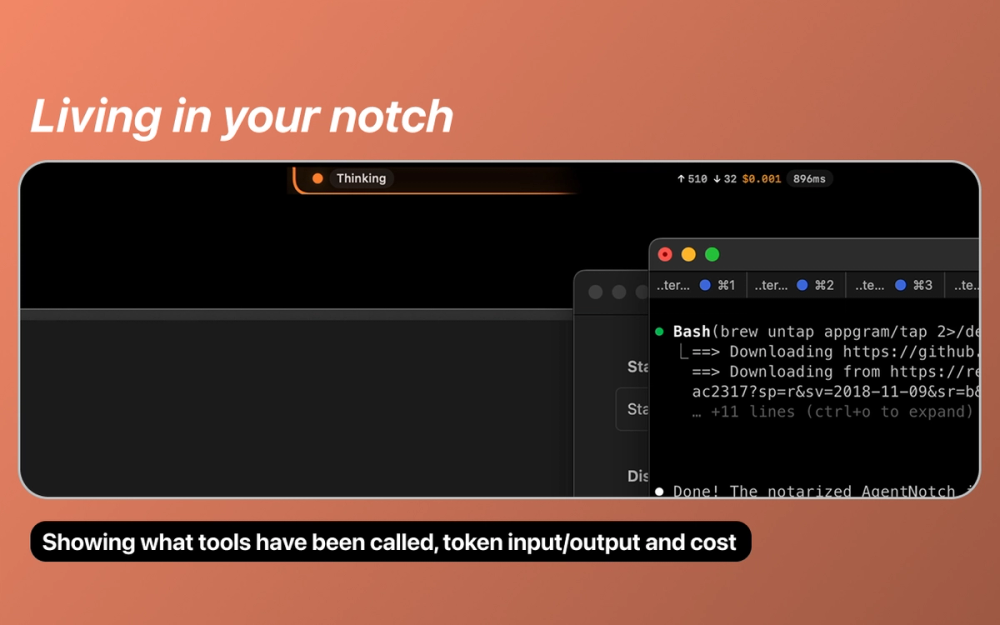
AgentNotch is a native macOS menu bar application designed to monitor AI coding assistants in real-time. It displays telemetry data directly in your Mac's notch area, allowing developers to track what their AI assistants like Claude Code and OpenAI Codex are doing without leaving their editor. The app receives data through OpenTelemetry Protocol (OTLP), showing tool calls, token usage, and estimated API costs as they happen. Built with Swift and requiring macOS 14.0 or later, AgentNotch provides 100% local processing with no data sent externally.
Getting started with AgentNotch is straightforward. Follow these steps to set up real-time monitoring for your AI coding assistants:
1. Install AgentNotch - Use Homebrew with the commands: brew tap AppGram/tap followed by brew install --cask agentnotch. Alternatively, download from the GitHub Releases page, unzip, and drag to your Applications folder.
2. Configure Claude Code - Set the environment variable: export OTEL_EXPORTER_OTLP_ENDPOINT="http://localhost:4318" in your terminal configuration.
3. Configure Codex CLI (v0.79+) - Edit ~/.codex/config.toml and set the OTLP/HTTP endpoint to http://localhost:4318/v1/logs.
4. Launch and Monitor - Start AgentNotch from your Applications folder. The app will listen on port 4318 for telemetry data and display activity in your menu bar or notch area.
5. Customize Display - Use the app controls to toggle token count visibility, cost estimates, and filter by AI source. Click the icon for a detailed breakdown view.
Real-Time Activity Monitoring - Displays tool calls as they happen, including file reads, code edits, and shell commands executed by your AI assistants.
Token Usage Tracking - Shows input and output token counts in real-time, helping you understand how much of the context window is being utilized.
Cost Estimation - Provides real-time API cost estimates based on token usage, helping you manage your AI assistant spending.
Source-Specific Indicators - Uses distinct colors for different AI sources: orange for Claude Code, blue for Codex, and light blue for unknown sources.
Minimal Footprint Design - Sits unobtrusively in your Mac's notch or menu bar, expanding on hover and collapsing to just an icon when not in use.
Privacy-First Architecture - All data processing happens locally on your machine with no external data transmission, ensuring your coding activities remain private.
#1 Monitor Claude Code Sessions - Developers using Claude Code can track every file read, edit, and shell command in real-time, ensuring transparency in what the AI assistant is doing to their codebase.
#2 Track Codex CLI Activities - OpenAI Codex users can monitor their CLI sessions, seeing exactly which operations are being performed and how many tokens are consumed.
#3 Budget Management for AI Tools - Teams and individual developers can use the cost estimation feature to track API spending in real-time, helping stay within budget constraints.
#4 Debug AI Assistant Behavior - When AI assistants produce unexpected results, AgentNotch helps developers understand what operations were performed, aiding in debugging and improvement.
#5 Audit AI Tool Usage - Organizations can use AgentNotch to maintain visibility into how AI coding assistants interact with their codebase for compliance and security purposes.
What macOS version is required to run AgentNotch? AgentNotch requires macOS 14.0 (Sonoma) or later. It works optimally on Macs with a notch (2021 and newer models), but also functions on any Mac by falling back to the standard menu bar.
Is my coding data sent to external servers? No, AgentNotch processes all telemetry data 100% locally on your machine. No data is transmitted externally, ensuring complete privacy of your coding activities.
Which AI coding assistants are supported? AgentNotch currently supports Claude Code and OpenAI Codex CLI (version 0.79 and above). Both tools need to be configured to send telemetry to the local OTLP endpoint.
How accurate are the cost estimates? Cost estimates are calculated based on real-time token usage and current API pricing. While generally accurate, they should be considered estimates as actual billing may vary based on your specific API plan.
Can I use AgentNotch with other AI tools? AgentNotch works with any tool that supports OpenTelemetry Protocol (OTLP) for telemetry. Unknown sources appear with a light blue indicator in the app.