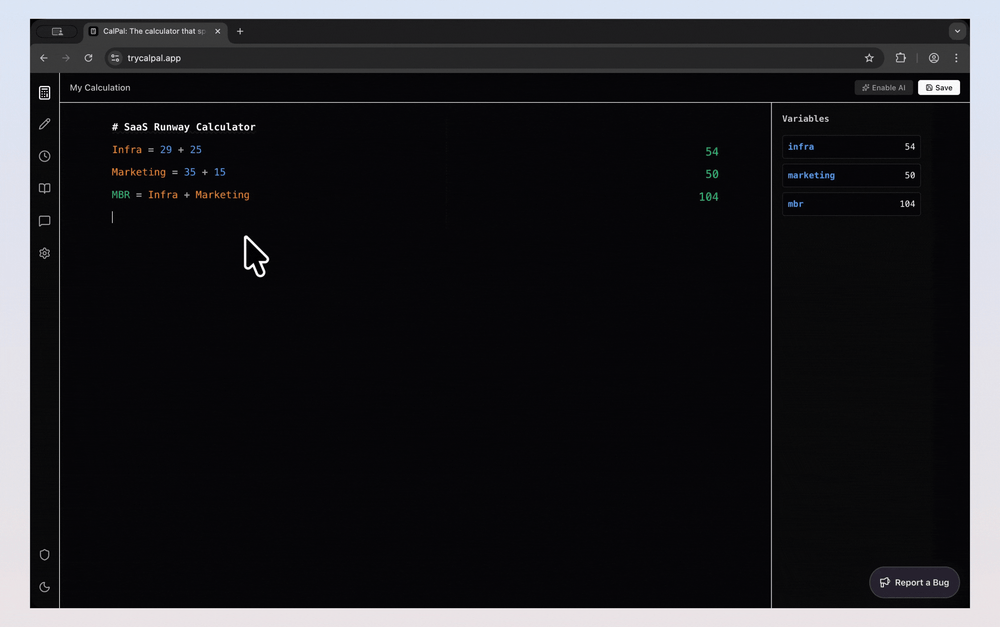
The notebook calculator that thinks for you (now with AI).
CalPal is a smart notepad calculator that combines the flexibility of a text editor with the power of mathematical computation. Unlike traditional calculators, CalPal lets you write calculations naturally with variables, formulas, and plain English, while automatically computing results as you type. It supports advanced features like variable tracking, aggregation functions (total, mean), unit conversions, timezone coordination, and AI-powered assistance through Google Gemini integration.
CalPal transforms how you work with numbers by combining the flexibility of a notebook with the intelligence of AI. Simply type your thoughts, numbers, and questions naturally, and CalPal handles the rest.
Getting Started:
Natural Language Calculations Write math expressions naturally with variables and formulas like a notebook, results compute automatically.
Variable Tracking Define variables once (e.g., salary = 5000) and reuse them throughout your calculation with a live variables sidebar.
Aggregation Functions Use built-in functions like total, mean(results) to sum previous lines or calculate statistics effortlessly.
Unit Conversions & Mixed Units Calculate with different units (100 km in miles, 5 km + 2000 m) and CalPal handles conversions automatically.
Timezone Coordination Track team members across timezones and coordinate meeting times with automatic timezone calculations.
AI-Powered Assistance Enable Google Gemini AI integration to understand natural language requests like "Plan a trip to Paris" and generate calculations.
Save & Share Save calculations locally or share them with others via a simple share link.
#1 Personal Finance & Budgeting Calculate net pay, taxes, expenses, and track financial variables with automatic updates when you change values.
#2 Quick Math & Problem Solving Solve everyday math problems, percentage calculations, and unit conversions without switching between tools.
#3 Team Coordination & Scheduling Coordinate meeting times across timezones, track team members' local times, and plan international schedules.
#4 Data Analysis & Statistics Sum values, calculate averages, and analyze datasets using aggregation functions with variables.
#5 Travel Planning & Currency Plan trips with currency conversions, distance calculations, and budget tracking in one notebook.
#6 Project Estimation & Costing Estimate project costs, calculate totals, apply tax rates, and adjust variables to see real-time impacts.
Is CalPal free to use? CalPal offers a free tier for basic calculations and a premium plan with advanced AI features, unlimited notebooks, and priority support.
Do I need to learn a special syntax or formula language? No. CalPal understands natural language, so you can write calculations the way you naturally think without memorizing functions or syntax.
Can CalPal handle complex mathematical operations? Yes. CalPal supports a wide range of mathematical operations from basic arithmetic to advanced formulas, with AI assistance for complex calculations.
How does CalPal compare to spreadsheet software? CalPal is designed for free-form thinking and quick calculations with context, while spreadsheets excel at structured data and large datasets. CalPal is more flexible and conversational.
Can I export or share my calculations? Yes. CalPal allows you to export notebooks in various formats and share calculations with others.