
GROOVY
Universal Search and Signaling across LLMs
UpdatedJan 15, 2026
URLgogroovy.ai
What is GROOVY?
How to use GROOVY?
Features
Use Cases
FAQ
Pricing
Free to Start
Free
Enterprise Deployment
Free
Universal Search and Signaling across LLMs
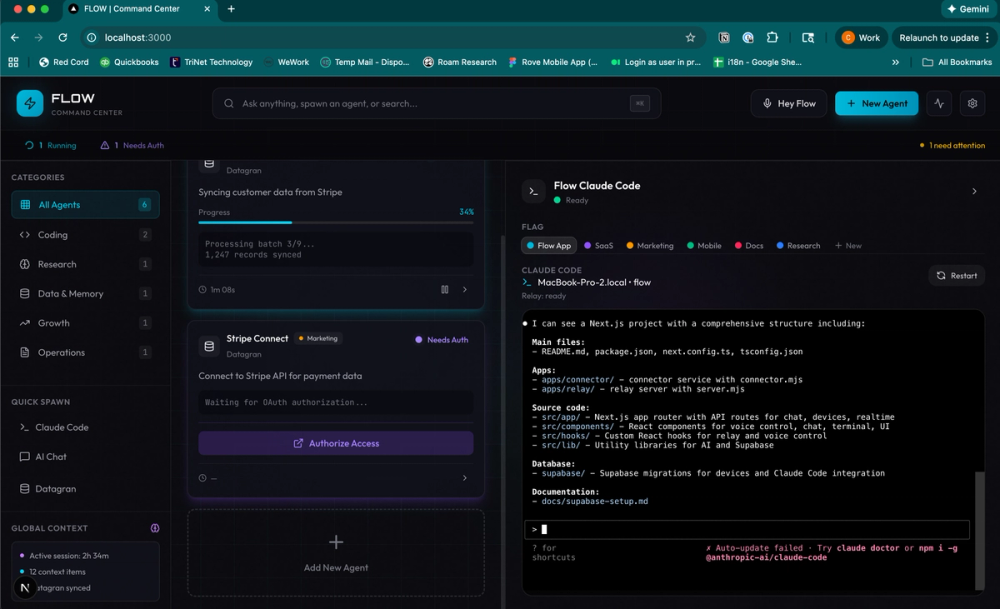
GROOVY is an enterprise AI command center that operates entirely on local infrastructure, enabling teams to automate workflows while maintaining complete data privacy and security. The platform functions as an intelligent coordination tool that connects with internal systems via a lightweight macOS desktop application, eliminating the need for cloud data transmission. By leveraging natural language commands through WhatsApp integration, GROOVY allows organizations to coordinate teams, analyze documents, and automate web tasks without compromising their security policies.
WhatsApp Integration - Coordinate teams and issue commands directly from mobile phones through WhatsApp groups Local Infrastructure Deployment - Runs entirely on your infrastructure ensuring data stays within your network and complies with internal policies Document Analysis - Analyze PDFs, Excel spreadsheets, and PowerPoint presentations to extract insights and generate reports Web Automation - Navigate internal tools, extract data, and automate repetitive web-based tasks with authentic browser sessions Marketing Analytics - Track and analyze campaigns across Google Ads, TikTok, Facebook, and LinkedIn platforms Flexible LLM Support - Choose between Claude, GPT-4, or your enterprise AI models for natural language processing Code Generation - Integrate Claude Code for development automation and technical workflow support
#1 Enterprise Workflow Automation - Automate repetitive business processes including data extraction, report generation, and system navigation while maintaining complete control over sensitive information #2 Team Coordination & Scheduling - Coordinate team meetings, synchronize calendars across departments, and manage scheduling through natural language commands via WhatsApp #3 Document Intelligence & Analysis - Extract insights from business documents, analyze quarterly reports, and process large volumes of PDFs and spreadsheets without manual review #4 Brand & Social Media Monitoring - Track brand mentions, monitor social presence, and analyze marketing campaign performance across multiple platforms from a single interface #5 Internal Knowledge Management - Integrate with Obsidian vaults and internal knowledge bases to enable AI-powered search and information retrieval across organizational documentation #6 Secure Data Processing - Process sensitive business data with AI capabilities while ensuring compliance with strict data governance and privacy requirements through local deployment
What makes GROOVY different from cloud-based AI tools? GROOVY runs entirely on your local infrastructure, meaning all data processing happens within your network. This ensures complete data privacy, compliance with internal policies, and no risk of data transmission outside your organization, unlike cloud-based alternatives.
Do I need to change my existing infrastructure to use GROOVY? No infrastructure changes are required. GROOVY operates through a lightweight macOS desktop application that connects to your existing systems via SSO and VPN, making deployment straightforward without complicated setup.
Which AI models can I use with GROOVY? GROOVY supports flexible LLM integration, allowing you to use Claude, GPT-4, or your own enterprise AI models. You simply connect your API keys during setup and can switch between models based on your needs.
How does the WhatsApp integration work? After installing GROOVY, you link your WhatsApp groups to enable command and coordination capabilities. Team members can then issue natural language commands like "Schedule the next team sync" or "Analyze this report" directly from their phones.
What are the system requirements for running GROOVY? GROOVY requires macOS 12 or later and is compatible with both Apple Silicon and Intel-based Macs. No account is required for installation, and you can start free with your enterprise API key integration.